Trusted By 2000+ Clients

Data Security Protocols Every Remote Developer Should Follow

This blog is a practical and step-by-step security for keeping your code safe. It breaks down the essential remote developer security protocols you need to prevent third-party data breaches and ways to implement secure software development lifecycle habits. Use these actionable checklists to eliminate easy entry points for hackers and keep your proprietary systems fully compliant.

Furqan Aziz
Furqan AzizCEO & Founder
Updated:28 July, 2026
Published:28 July, 2026

Furqan Aziz is CEO & Founder of InvoZone. He is a tech enthusiast by heart with 10+ years ... See more

Don’t Have Time To Read Now? Download It For Later.

When was the last time you connected to public Wi-Fi at a coffee shop while grabbing a latte?

It seemed completely harmless, right? 

We have all been there. For us, it is just a quick shortcut to get through your afternoon. 

In reality, those tiny and daily habits are exactly how modern hackers slip right through your company's digital perimeter.

Every remote connection is a potential open window for hackers.

As companies race to hire pre-vetted engineers, the stakes have never been higher. 

According to Verizon’s data, third-party involvement in data breaches has literally doubled from 15% to 30% in just a single year.

Whether you are a founder building a team or a remote developer protecting your craft, here is your ultimate and simple guide to staying safe.

Yes, compliance is tedious and nobody likes reading contracts. We have to talk about the boring-but-crucial legal guardrails. So here's exactly what needs to be in place.

Non-Disclosure Agreements (NDAs)

An NDA is a legal shield, but it won't stop a data leak caused by misconfigured permissions or uncontrolled environments. The real safety comes from building NDA compliance into your workflow so it's enforced by technology.

What every NDA should cover:

  • Clear definition of "confidential information" (source code, client data, proprietary algorithms, system architecture)
  • Explicit invention assignment agreements stating all work and code created are the exclusive property of the company
  • Jurisdiction and enforcement provisions enforceable in the developer's home country
  • Data localization and cross-border transfer rules where applicable

Remote Developer Action:

Before writing a single line of code, ensure your NDA is signed, understood, and enforceable. Keep a copy for your records.

Remote Access and Data Security Policies

Having formal, written rules is crucial for legal survival. In 2026, remote work has expanded regulatory exposure exponentially. For example, hiring just one remote engineer living in Spain, Germany, or the Netherlands instantly brings your organization under the strict compliance umbrella of GDPR. That's not a risk you want to play fast and loose with.

Your policies must clearly outline:

  • Company-approved hardware and software
  • Mandatory security protocols for all remote connections
  • Data handling and storage guidelines
  • Breach notification procedures - GDPR requires notification within 72 hours in qualifying cases.

For Organizations

Use formal remote access policy templates to ensure consistency across your team. Don't leave security to individual discretion. I've seen too many startups burned by assuming "everyone knows the rules."

Access Control & Identity: How Do We Lock Down Who Gets In?

Most hacks start with stolen or weak credentials. If you aren't guarding access and identity with absolute strictness, your systems are already open.

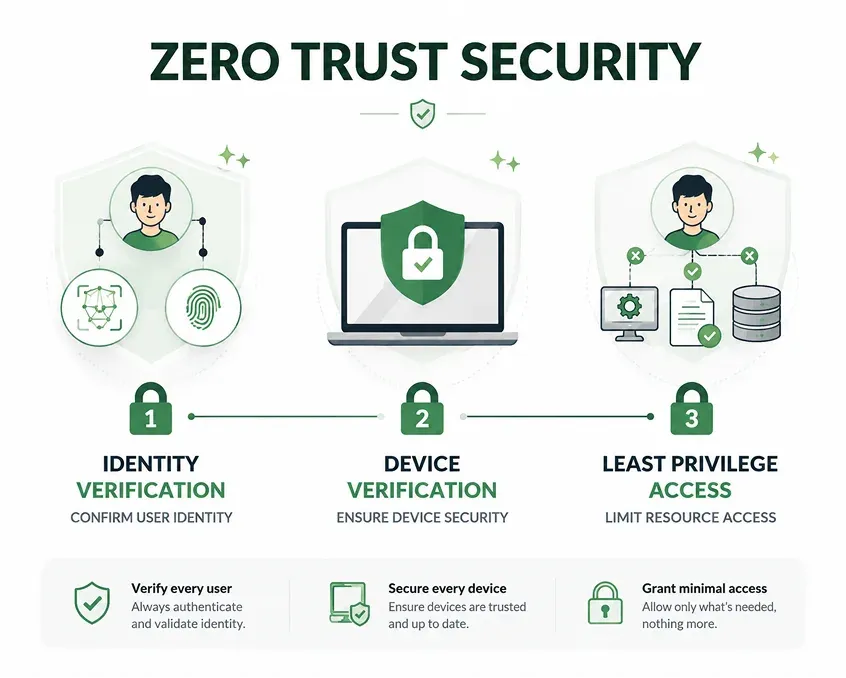
Zero Trust Architecture

"Never trust, always verify."

The old way of doing security was the "castle-and-moat" approach. This means once a user gets past your outer firewall or VPN, they are automatically trusted with access to everything inside.

Nowadays, that framework is obsolete. Today, 81% of organizations have fully implemented or are actively deploying a Zero-Trust model. No matter who you are or where you are logging in from, your identity, device health, and behavior are continuously checked before you're allowed access.

LEGACY SECURITY  ──► "You're logged in? Great, access to everything!"

ZERO-TRUST       ──► "I don't care who you are. Prove your identity and device health."
Least Privilege Access

Here's a simple rule: grant only the minimum permissions required for a developer to perform their specific task. This limits the "blast radius" of any potential security incident.

Why this matters

Organizations using granular access controls spend 43% less on incident remediation. Meanwhile, 74% of security breaches leverage privilege escalation or unused access.

  • Developers should access only the systems they need
  • Use separate accounts for sandbox, quality assurance, and production environments
  • Implement role-based access controls (RBAC) to minimize permissions
  • Automate removal of unnecessary permissions when roles change or team members depart

Remote Developer Action: Review your access rights today. Do you really need admin access to everything?

Multi-Factor Authentication (MFA)

I'll keep this simple: MFA is non-negotiable.

MFA adds an extra authentication layer, protecting against stolen credentials. Credential theft remains one of the most common attack vectors.

Where MFA should be enabled:

  • Email
  • VPN
  • Chat apps
  • Cloud storage
  • CRMs
  • GitHub
  • Codespaces
  • And anywhere else developers access your network

Google reports MFA blocks 99.9% of automated attacks. The HIPAA Security Rule updates now mandate MFA for remote and privileged access to electronic protected health information.

Remote Developer Action

Enable MFA on every work-related account. Use hardware security keys over SMS-based codes where possible. And yes, I know it's annoying. Do it anyway

Secure Connections: How Do We Protect Your Code in Transit?

You cannot control the networks your remote developers use, but you can control how they connect to your systems.
Virtual Private Networks (VPNs) & Beyond

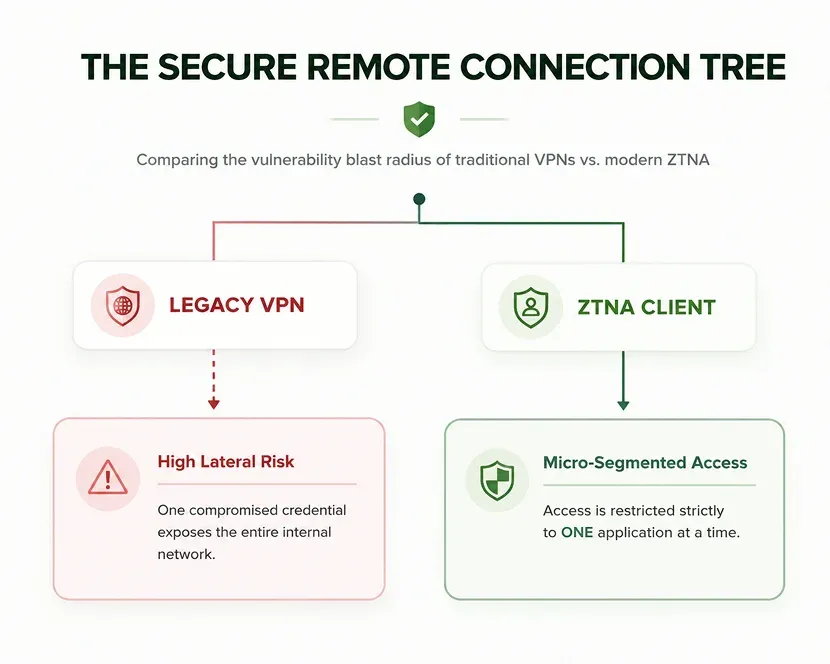
A Virtual Private Network (VPN) creates an encrypted tunnel for your data to travel through. Traditional VPNs have major vulnerabilities. 92% of organizations worry about ransomware spreading laterally across legacy VPN connections.

For modern remote teams, the industry is transitioning to Zero-Trust Network Access (ZTNA). Instead of placing a developer on the broader company network, ZTNA grants secure, isolated connections to individual apps on a case-by-case basis.

End-to-End Encryption

60% of data breaches involve unencrypted data in transit. That's unacceptable.

  • Transport Layer Security (TLS) 1.3 is the minimum standard for data in transit
  • AES-256 encryption is mandatory for persistent data storage on all devices processing sensitive information
  • Full-disk encryption on laptops, smartphones, and external drives is non-negotiable
  • Encrypt remote sessions end-to-end to secure screen sharing and control between device

Remote Developer Action: Verify that every tool you use implements TLS 1.3 or higher. Enable full-disk encryption on all devices. Never transmit sensitive data over unencrypted channels.

The Easiest Way to Build Safely: Let InvoZone Handle Your Pipeline Security

Building, auditing, and maintaining these advanced security layers across a global, distributed engineering team takes a massive amount of time and specialized expertise.

At InvoZone, we take the security and compliance burden completely off your plate. Every developer we match with your company operates under strict corporate security protocols, signs airtight Unilateral NDAs and IP Assignment agreements. We work within secure and encrypted staging environments from day one.

Ready to scale your team with total peace of mind in just 24 hours? 

At the end of the day, remote security is just a daily habit you all need to incorporate.

It’s easy to take shortcuts to save a few minutes. We've all connected to public Wi-Fi at a coffee shop or pasted quick code into public AI tools. However,  those quick shortcuts are exactly how hackers get in.  Make the aforementioned safety steps your daily routine. That is the easiest way to protect your code, your company, and your career.

Share to:

Frequently Asked Questions

Find answers to common questions about our services

1.Do I really need an MFA for everything?

Most common cyberattacks are automated credential stuffing attacks. MFA blocks over 99% of them. It's the single most effective security step you can take.

It's why organizations like the NCSC and CISA strongly recommend it as the absolute minimum standard. Recent major breaches impacting companies like Ticketmaster and Santander likely would not have happened if mandatory MFA had been enforced. A small inconvenience for you is a massive deterrent for an attacker.

2.Is public Wi-Fi safe if I'm using a VPN?

It is significantly safer, but still carries risk. For highly sensitive tasks like pushing production code or accessing database credentials skip the coffee shop Wi-Fi entirely and tether to your phone's personal hotspot.

3.How often should I change my passwords?

Only when you actually suspect a breach. Modern cybersecurity frameworks (like the National Institute of Standards and Technology—NIST) have proven that forcing developers to change passwords every 90 days actually leads to weaker, highly predictable passwords (like changing P@ssword1 to P@ssword2). Focus on strength, not rotation schedules.

4.Are AI coding assistants safe to use?

Only if you are using dedicated enterprise-grade accounts that guarantee your data won't be used to train public models. Never paste raw, proprietary algorithms or private API keys into free, public LLMs. And always review the output as AI-generated code has a bad habit of introducing outdated and insecure packages.

5.What is the biggest security threat that most developers miss?

Third-party dependency vulnerabilities. Hackers love targeting the open-source libraries you import. Every single package or dependency you pull into your codebase is a potential backdoor. Run automated dependency scanners (like Snyk or npm audit) on every build.

6.What should I do the second I suspect a breach?

Disconnect first, ask questions later. Pull your internet connection, change your primary passwords from an uncompromised device, and report the incident to your security team immediately. When it comes to data breaches, quick transparency reduces final damages by millions of dollars.

7.Is using a password manager actually worth the hassle?

100% yes. Human brains are not designed to remember eighty different 16-character randomized passwords. A password manager completely eliminates password reuse, which is the root cause of almost every major credential-stuffing attack.

When was the last time you connected to public Wi-Fi at a coffee shop while grabbing a latte?

It seemed completely harmless, right? 

We have all been there. For us, it is just a quick shortcut to get through your afternoon. 

In reality, those tiny and daily habits are exactly how modern hackers slip right through your company's digital perimeter.

Every remote connection is a potential open window for hackers.

As companies race to hire pre-vetted engineers, the stakes have never been higher. 

According to Verizon’s data, third-party involvement in data breaches has literally doubled from 15% to 30% in just a single year.

Whether you are a founder building a team or a remote developer protecting your craft, here is your ultimate and simple guide to staying safe.

Yes, compliance is tedious and nobody likes reading contracts. We have to talk about the boring-but-crucial legal guardrails. So here's exactly what needs to be in place.

Non-Disclosure Agreements (NDAs)

An NDA is a legal shield, but it won't stop a data leak caused by misconfigured permissions or uncontrolled environments. The real safety comes from building NDA compliance into your workflow so it's enforced by technology.

What every NDA should cover:

  • Clear definition of "confidential information" (source code, client data, proprietary algorithms, system architecture)
  • Explicit invention assignment agreements stating all work and code created are the exclusive property of the company
  • Jurisdiction and enforcement provisions enforceable in the developer's home country
  • Data localization and cross-border transfer rules where applicable

Remote Developer Action:

Before writing a single line of code, ensure your NDA is signed, understood, and enforceable. Keep a copy for your records.

Remote Access and Data Security Policies

Having formal, written rules is crucial for legal survival. In 2026, remote work has expanded regulatory exposure exponentially. For example, hiring just one remote engineer living in Spain, Germany, or the Netherlands instantly brings your organization under the strict compliance umbrella of GDPR. That's not a risk you want to play fast and loose with.

Your policies must clearly outline:

  • Company-approved hardware and software
  • Mandatory security protocols for all remote connections
  • Data handling and storage guidelines
  • Breach notification procedures - GDPR requires notification within 72 hours in qualifying cases.

For Organizations

Use formal remote access policy templates to ensure consistency across your team. Don't leave security to individual discretion. I've seen too many startups burned by assuming "everyone knows the rules."

Access Control & Identity: How Do We Lock Down Who Gets In?

Most hacks start with stolen or weak credentials. If you aren't guarding access and identity with absolute strictness, your systems are already open.

Zero Trust Architecture

"Never trust, always verify."

The old way of doing security was the "castle-and-moat" approach. This means once a user gets past your outer firewall or VPN, they are automatically trusted with access to everything inside.

Nowadays, that framework is obsolete. Today, 81% of organizations have fully implemented or are actively deploying a Zero-Trust model. No matter who you are or where you are logging in from, your identity, device health, and behavior are continuously checked before you're allowed access.

LEGACY SECURITY  ──► "You're logged in? Great, access to everything!"

ZERO-TRUST       ──► "I don't care who you are. Prove your identity and device health."

Least Privilege Access

Here's a simple rule: grant only the minimum permissions required for a developer to perform their specific task. This limits the "blast radius" of any potential security incident.

Why this matters

Organizations using granular access controls spend 43% less on incident remediation. Meanwhile, 74% of security breaches leverage privilege escalation or unused access.

  • Developers should access only the systems they need
  • Use separate accounts for sandbox, quality assurance, and production environments
  • Implement role-based access controls (RBAC) to minimize permissions
  • Automate removal of unnecessary permissions when roles change or team members depart

Remote Developer Action: Review your access rights today. Do you really need admin access to everything?

Multi-Factor Authentication (MFA)

I'll keep this simple: MFA is non-negotiable.

MFA adds an extra authentication layer, protecting against stolen credentials. Credential theft remains one of the most common attack vectors.

Where MFA should be enabled:

  • Email
  • VPN
  • Chat apps
  • Cloud storage
  • CRMs
  • GitHub
  • Codespaces
  • And anywhere else developers access your network

Google reports MFA blocks 99.9% of automated attacks. The HIPAA Security Rule updates now mandate MFA for remote and privileged access to electronic protected health information.

Remote Developer Action

Enable MFA on every work-related account. Use hardware security keys over SMS-based codes where possible. And yes, I know it's annoying. Do it anyway

Secure Connections: How Do We Protect Your Code in Transit?

You cannot control the networks your remote developers use, but you can control how they connect to your systems.

Virtual Private Networks (VPNs) & Beyond

A Virtual Private Network (VPN) creates an encrypted tunnel for your data to travel through. Traditional VPNs have major vulnerabilities. 92% of organizations worry about ransomware spreading laterally across legacy VPN connections.

For modern remote teams, the industry is transitioning to Zero-Trust Network Access (ZTNA). Instead of placing a developer on the broader company network, ZTNA grants secure, isolated connections to individual apps on a case-by-case basis.

End-to-End Encryption

60% of data breaches involve unencrypted data in transit. That's unacceptable.

  • Transport Layer Security (TLS) 1.3 is the minimum standard for data in transit
  • AES-256 encryption is mandatory for persistent data storage on all devices processing sensitive information
  • Full-disk encryption on laptops, smartphones, and external drives is non-negotiable
  • Encrypt remote sessions end-to-end to secure screen sharing and control between device

Remote Developer Action: Verify that every tool you use implements TLS 1.3 or higher. Enable full-disk encryption on all devices. Never transmit sensitive data over unencrypted channels.

The Easiest Way to Build Safely: Let InvoZone Handle Your Pipeline Security

Building, auditing, and maintaining these advanced security layers across a global, distributed engineering team takes a massive amount of time and specialized expertise.

At InvoZone, we take the security and compliance burden completely off your plate. Every developer we match with your company operates under strict corporate security protocols, signs airtight Unilateral NDAs and IP Assignment agreements. We work within secure and encrypted staging environments from day one.

Ready to scale your team with total peace of mind in just 24 hours? 

At the end of the day, remote security is just a daily habit you all need to incorporate.

It’s easy to take shortcuts to save a few minutes. We've all connected to public Wi-Fi at a coffee shop or pasted quick code into public AI tools. However,  those quick shortcuts are exactly how hackers get in.  Make the aforementioned safety steps your daily routine. That is the easiest way to protect your code, your company, and your career.

Let’s Discuss Your Needs

Share your details with us. We’ll take it from there.

Get in Touch Now

Share to:

Related Articles

Let’s Discuss Your Needs

Tell us about your project. we'll take it from there

Phone
Choose Your Tech Stack
Top Web Development Companies in Mississauga
Software Development Company - Design Rush
Top Software Development Companies in Toronto, ON
Best Software Development Companies In 2021
Fatest growing app development companies
Top 100+ Software Development Companies in 2021
Finest Mobile App Developers in Canada - March 2021
Top eCommerce Development Companies in the USA
Top Web Development Companies
Top Web Development Companies in Mississauga
Software Development Company - Design Rush
Top Software Development Companies in Toronto, ON
Best Software Development Companies In 2021
Fatest growing app development companies
Top 100+ Software Development Companies in 2021
Finest Mobile App Developers in Canada - March 2021
Top eCommerce Development Companies in the USA
Top Web Development Companies
Top Web Development Companies in Mississauga
Software Development Company - Design Rush
Top Software Development Companies in Toronto, ON
Best Software Development Companies In 2021
Fatest growing app development companies
Top 100+ Software Development Companies in 2021
Finest Mobile App Developers in Canada - March 2021
Top eCommerce Development Companies in the USA
Top Web Development Companies