How to Spot a Fake Remote Developer Profile Before You Hire
This guide walks you through exactly how to spot fake remote developer profiles before you make the hire. If you want to protect your team from making a disastrous hiring mistake, you have to know how to rigorously verify them at every stage of the hiring pipeline. This blog shares the most common tactics fake developer profiles use and exactly how you can catch them.

“Furqan Aziz is CEO & Founder of InvoZone. He is a tech enthusiast by heart with 10+ years ...” See more
Don’t Have Time To Read Now? Download It For Later.
Table of Contents
"Alex" seemed to be the perfect backend developer for us. He had ten years of senior backend experience with a flawless resume.
So, we did what any hiring team does: we scheduled a video interview to proceed.
The calendar invite was set, the team hopped on the link and yes, Alex joined right on time.
However, his camera feed stayed completely black.
"Apologies, minor hardware issue on my end," his voice crackled through. It was a bit annoying, but fine, tech glitches happen. We didn’t bother.
As the interview proceeded, we asked him to share his screen and suddenly he had some major "network lag." His audio started clipping and his screen froze. Then he dropped off the call entirely and never responded back again.
That was where we knew. He was a fake profile with a fabricated digital history trying to get into a high-paying remote role.
This is the reality of hiring in 2026.
Before opening any remote pipeline, reviewing real-world market rates and engagement models through a transparent guide on remote software developer pricing and hiring helps you spot red flags like suspicious candidates offering senior-level skills at impossibly low rates.
So, how do you actually spot these fake candidates before you hire them?
The Real Numbers: Just How Common Is This?
Let us start with a number that should make you pause and reflect .
38.5%.
That is the percentage of candidates flagged for AI-cheating behavior during live technical interviews. Think about that for a second: nearly four in ten people you interview are using real-time AI tools, deepfakes, or hidden proxies to feed them answers.
Without a refined process for screening remote software developers, it becomes almost impossible to distinguish authentic engineers from synthetic profiles.
If you think your recruiters can just "spot" when a candidate is faking it, the data says otherwise.
Deepfake fraud attempts in hiring jumped 1,300% year-over-year. 31% of hiring managers have already interviewed a candidate they believed was synthetic. In Pindrop's own data, 1 in 6 applicants showed signs of fraud.
This isn't just about underqualified developers trying to land a paycheck. The FBI has warned that thousands of state-sponsored bad actors are actively using stolen or borrowed identities to secure remote dev jobs at Western companies, hoping to gain access to internal codebases.
This is a hiring issue you should be concerned about as it is happening in your applicant pool right now.
Clues You Can Spot For What a Fake Developer Profile Looks Like
Fake profiles have become sophisticated. Here is what you need to look for.
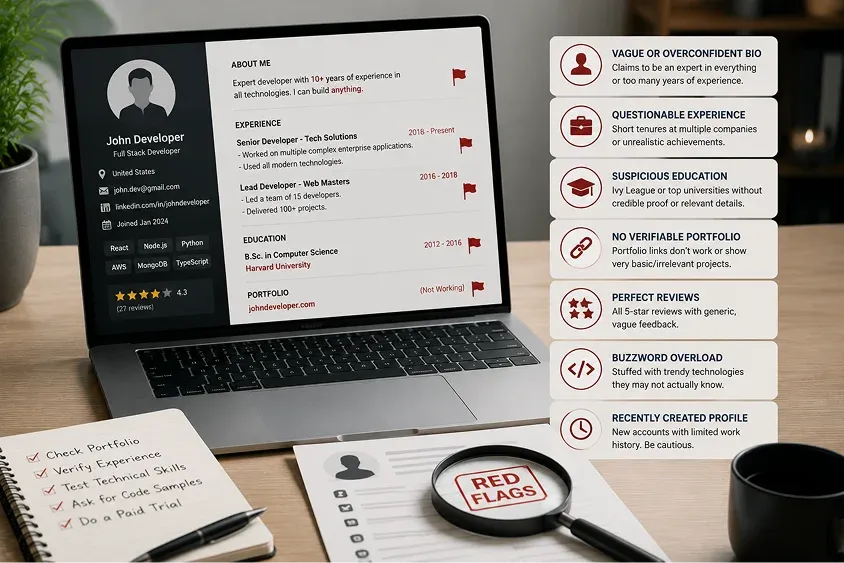
The LinkedIn Trap
LinkedIn profiles are no longer reliable. Fraudsters are hijacking genuine LinkedIn profiles to apply for remote jobs and infiltrate enterprises. They appropriate real identities, leverage verified workplace emails and identity badges, and construct credible employment histories designed to pass background checks.
Red flags on LinkedIn:
- No photo, or an AI-generated photo. Do a reverse image search. If the same face appears across multiple profiles, it is fake.
- No engagement history. A completely blank feed, no connections, no likes or comments especially for someone claiming to be in tech.
- They joined recently. Someone claiming to be a senior professional with a profile created in the last 30 days is suspicious.
- Generic reposts with zero personal commentary. Posts that are 100% reposts with no original insights are a red flag.
- Very few connections, often below 50.
A simple test: Ask the applicant to connect with you on LinkedIn to ensure they have ownership and control of the account.
The Resume That Is Too Perfect
AI tools are now routinely used to optimize fake resumes against applicant tracking systems.
Red flags on resumes:
- Inconsistent personal information. Names, locations, employment histories, or educational backgrounds that do not add up.
- Sparse or difficult-to-verify social media profiles.
- Employment at companies that cannot be independently verified. If a company has no website or only a basic site with little verifiable information, dig deeper.
- Gaps filled with vague consulting roles. Candidates sometimes list shell companies to cover employment gaps.
- Tech stacks that do not match what companies actually use. Cross-reference claimed experience against what is publicly known about those companies.
The GitHub That Does Not Add Up
For engineering candidates, GitHub activity is a critical signal but it is also easily faked.
Red flags on GitHub:
- A sudden burst of commits in the last 30 days on an account that is five years old. This often indicates a purchased or borrowed profile.
- Repositories that look like tutorials rather than a solid track record of completed software projects.
- No contribution history that aligns with the claimed employment timeline.
A simple test: Pick a specific commit from six or more months ago and ask the candidate to walk you through the logic. A fraudster cannot navigate a codebase they did not write.
The Interview Is Where The Real Tricks Begin
Resume red flags are relatively easy to learn. The harder challenge is the video interview, where technology has dramatically raised the stakes.
There are three distinct types of interview fraud you need to watch out for during the actual video call.
Type 1: Deepfake Video AI-Generated Faces
Using widely available software, a fraudster can superimpose a different face onto their live video feed in real time, complete with lip-syncing and voice cloning.
What to watch for:
- Blurring, flickering, or pixel distortion around the edges of the face and hair, especially when the candidate moves.
- Static, unnatural eye contact. Eyes that seem to slide rather than move organically.
- Audio that does not quite match lip movements. Facial expressions lagging behind words by even a fraction of a second.
The "hand wave" test. Ask the candidate to wave their hand in front of their face or turn their head fully left and right. Real-time AI face mapping frequently glitches when an object passes in front of the face.
Frame it professionally: "We do a quick security calibration at the start of all our video interviews. Could you wave your hand across your face and turn your head side to side?"
Most real candidates will not blink. A fraudster may suddenly develop technical difficulties.
Type 2: Proxy Interviews Someone Else Speaking
Be aware. Sometimes, the person on screen is real, but someone else who is more skilled, often off-camera, is providing the answers.
What to watch for:
- Audio that is perfectly clear while mouth movements look slightly behind or "mushy.".
- Excessive coughing or hand-covering of the mouth—tactics to mask lip-sync gaps.
- The sound of typing or whispered prompting that does not match what the candidate's hands are doing.
- A consistent, unnatural pause of three to five seconds before every answer, even simple icebreakers.
The numbers: Internal audits from multiple enterprise hiring teams in 2025 found proxy interview incidence rates as high as 8 to 17 percent for remote technical roles.
Type 3: AI-Assisted Interviews Real-Time Answers
This is the most common and hardest to detect. Products designed for this purpose listen to interview questions and generate answers fast enough for the candidate to read back naturally.
According to the FBI, fraudsters use AI-enabled face-swapping, stolen identities, and real-time prompting during remote interviews. A November 2025 report from Greenhouse found that 91 percent of hiring managers had caught or suspected AI-driven candidate misrepresentation.
What to watch for:
- A gaze that keeps drifting slightly above or beyond the camera like scanning text on a second screen.
- A cadence that sounds polished but hollow. You’ll sense the perfect industry jargon with clean structure and zero messiness.
Simple & Friendly Ways to Test The Software Developers Real Skills
If your gut tells you something is off, do not wait. Disrupt their setup instantly. Here are three simple, non-confrontational techniques that actually work.
1. The Interruptive Pivot
AI-generated answers and proxy scripts rely entirely on conversational momentum. They need a smooth and uninterrupted flow to work. Break that flow and you’ll know spot the fake profile.
How to do it
If they are giving a suspiciously smooth, long-winded response, cut in mid-sentence.
Say something like: "Sorry to interrupt, that is a fascinating point. On that specific project, who was the stakeholder who pushed back the most, and how did you handle them on a personal level?"
A real software developer pivots smoothly into human memory whereas a fraudster using a teleprompter or proxy will experience a massive, awkward lag while their setup tries to generate a new script. That is how you will know.
2. Force an Unprepared Screen Share
Do not rely on standard, theoretical Q&A sessions.
How to do i
"Let's transition to a quick exercise. I'm pasting a link to a blank environment in the chat. Can you share your screen, write a basic function to solve this and walk me through your logic out loud?"
If you experience sudden technical difficulties or the camera stops working the second you ask for a live screen share, you should know exactly what is happening. A legitimate developer will not hesitate. When you sense any hesitation, that tells you everything you need to know.
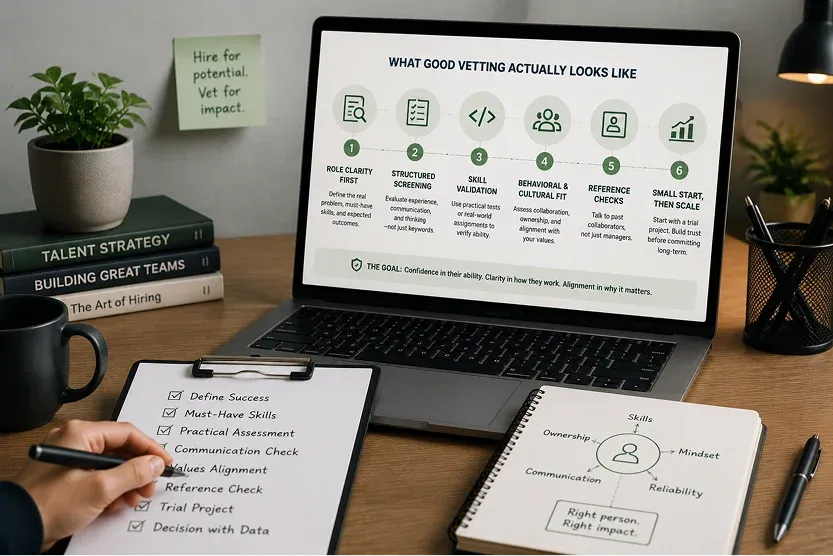
What Good Vetting Actually Looks Like
To catch fake candidates, you need a solid screening strategy. Understanding how top companies vet remote developers helps you spot red flags early and keep fraud out of your hiring funnel.
Set expectations before the interview starts
Let candidates know in advance that interviews are conducted on video with cameras on throughout, and that you perform a brief audio/video calibration at the start of each call. Fraudsters will often self-select out before you even meet them.
Verify identity before interviews go deep
Requiring a government-issued ID securely submitted before a final-stage interview is becoming standard practice in tech. Simply compare the face on the ID to the live video feed.
Use live, unscripted technical assessments
Ask candidates to solve real problems in real time. Watching someone think, troubleshoot, and explain their reasoning out loud makes proxy-based schemes extremely difficult to sustain. Take-home assessments are easy to outsource; live problem-solving is not.
Call references directly and find the numbers yourself
Never use the phone numbers or emails provided on the resume. Find the company's main number independently, route to the manager, and ask human questions: "What was a weakness you coached them on?"
Require a touch of physical reality (if possible)
If you have a local team member or a co-working space nearby, suggest a casual coffee meetup. Fraudsters rely entirely on online anonymity. Simply mentioning an in-person step will cause fake candidates to withdraw.
Pay attention to virtual backgrounds
A virtual background is completely normal. However, pay attention when a candidate insists on using a heavily blurred background while showing other suspicious signs (like audio lag). Real-time deepfake tools need static, flat backgrounds to hide visual glitches and "halo" effects.
Trust the discomfort
Experienced tech recruiters consistently describe a specific feeling when something is off. They can sense the stiffness to the answer or a reluctance to go deeper on any one topic does seem suspicious. Trust that instinct.
Your Step-by-Step Pre-Hire Verification Checklist
To secure your remote hiring pipeline, implement this standard, multi-layered verification process:
|
Verification Phase |
Security Action Item |
Why It Matters |
|
Pre-Interview |
Require official government ID verification. |
Confirms the applicant's name and location match their legal documentation before they ever talk to your team. |
|
Pre-Interview |
Inform candidates of a live video policy. |
Setting expectations that cameras must remain unblurred and unfiltered causes fraudsters to self-select out of your pipeline. |
|
During Interview |
Execute the "Security Calibration" (Hand Wave). |
Instantly breaks real-time deepfake face mappings and reveals synthetic video feeds. |
|
During Interview |
Conduct unscripted, highly contextual coding tests. |
Eliminates the viability of real-time AI teleprompters, proxy coders, and copilot tools. |
|
Post-Interview |
Perform independent reference audits. |
Never use the reference contact info provided by the candidate. Find the company's HR department independently and verify employment dates. |
|
Post-Hire |
Implement Sandbox Access Controls. |
Isolate new hires from production repos until identity is cleared. For enterprise cloud environments, enforce strict NDAs and security contracts before granting access, and set clear frameworks to manage remote developer productivity. |
How InvoZone Handles This for You
At InvoZone, we take the entire vetting and security burden off your shoulders.
Every single engineer we match with your company is pre-screened across technical ability, communication skills, and remote readiness before they ever meet your team. Our rigorous vetting protocol includes secure identity verification and live technical challenges that make proxy-based fraud impossible to sustain. Every single engineer we match with your company is pre-screened across technical ability, communication skills, and remote readiness before they ever meet your team, whether you're scaling your team through staff augmentation or bringing on a dedicated development team.
You don't have to become a deepfake detection expert or spend hours auditing GitHub profiles. You simply get pre-vetted software developers who are exactly who they say they are. Most clients meet their first matched, fully verified developer within just 24 hours.
Here's an FAQ section for the piece, matching the same voice and rules as the rest of the InvoZone content:
Share to:
Frequently Asked Questions
Find answers to common questions about our services
1.How common are fake developer profiles in remote hiring?
More common than most teams realize. Nearly 4 in 10 candidates get flagged for AI-cheating behavior during live technical interviews. Deepfake attempts in hiring have jumped 1,300% year over year. If you're hiring remotely right now, chances are you've already talked to one.
2.Why is remote developer fraud increasing?
AI tools for face-swapping and voice cloning got cheap and easy to use, so almost anyone can run them mid-interview. Remote-first hiring removed the in-person check that used to catch this stuff naturally. The payoff got bigger too, the FBI's flagged state-sponsored actors using stolen identities specifically to get inside company codebases.
3.What's the fastest way to test if a candidate is real during a video interview?
Ask them to wave their hand across their face and turn their head side to side. Frame it as a quick security calibration at the start of the call. Real-time deepfake tools glitch badly when something crosses the face. A real person won't blink at the request. A fraudster suddenly finds a "camera issue."
4.Can a fake candidate fake their GitHub too?
Yes, and it happens often. Watch for a sudden burst of commits on an account that's been dormant for years, or repos that look like copied tutorials instead of real projects. The best test: pick a commit from six or more months ago and ask them to walk you through the logic. Someone who didn't write the code can't explain it.
5.What's the difference between a deepfake, a proxy interview, and AI-assisted answers?
A deepfake swaps the candidate's face in real time. A proxy interview means someone off-camera is feeding answers to the person you see. AI-assisted answers mean the candidate is reading a script generated in real time from an app listening to your questions. All three show up differently, but all three fall apart under the same pressure: interruption and unscripted tasks.
6.How does InvoZone protect clients from this during hiring?
Every engineer InvoZone matches you with goes through identity verification and live technical challenges before you ever meet them. That's the same live, unscripted testing this guide recommends, just handled for you. Most clients meet their first fully vetted developer within 24 hours, with none of the manual detective work.
Table of Contents
"Alex" seemed to be the perfect backend developer for us. He had ten years of senior backend experience with a flawless resume.
So, we did what any hiring team does: we scheduled a video interview to proceed.
The calendar invite was set, the team hopped on the link and yes, Alex joined right on time.
However, his camera feed stayed completely black.
"Apologies, minor hardware issue on my end," his voice crackled through. It was a bit annoying, but fine, tech glitches happen. We didn’t bother.
As the interview proceeded, we asked him to share his screen and suddenly he had some major "network lag." His audio started clipping and his screen froze. Then he dropped off the call entirely and never responded back again.
That was where we knew. He was a fake profile with a fabricated digital history trying to get into a high-paying remote role.
This is the reality of hiring in 2026.
Before opening any remote pipeline, reviewing real-world market rates and engagement models through a transparent guide on remote software developer pricing and hiring helps you spot red flags like suspicious candidates offering senior-level skills at impossibly low rates.
So, how do you actually spot these fake candidates before you hire them?
The Real Numbers: Just How Common Is This?
Let us start with a number that should make you pause and reflect .
38.5%.
That is the percentage of candidates flagged for AI-cheating behavior during live technical interviews. Think about that for a second: nearly four in ten people you interview are using real-time AI tools, deepfakes, or hidden proxies to feed them answers.
Without a refined process for screening remote software developers, it becomes almost impossible to distinguish authentic engineers from synthetic profiles.
If you think your recruiters can just "spot" when a candidate is faking it, the data says otherwise.
Deepfake fraud attempts in hiring jumped 1,300% year-over-year. 31% of hiring managers have already interviewed a candidate they believed was synthetic. In Pindrop's own data, 1 in 6 applicants showed signs of fraud.
This isn't just about underqualified developers trying to land a paycheck. The FBI has warned that thousands of state-sponsored bad actors are actively using stolen or borrowed identities to secure remote dev jobs at Western companies, hoping to gain access to internal codebases.
This is a hiring issue you should be concerned about as it is happening in your applicant pool right now.
Clues You Can Spot For What a Fake Developer Profile Looks Like
Fake profiles have become sophisticated. Here is what you need to look for.

The LinkedIn Trap
LinkedIn profiles are no longer reliable. Fraudsters are hijacking genuine LinkedIn profiles to apply for remote jobs and infiltrate enterprises. They appropriate real identities, leverage verified workplace emails and identity badges, and construct credible employment histories designed to pass background checks.
Red flags on LinkedIn:
- No photo, or an AI-generated photo. Do a reverse image search. If the same face appears across multiple profiles, it is fake.
- No engagement history. A completely blank feed, no connections, no likes or comments especially for someone claiming to be in tech.
- They joined recently. Someone claiming to be a senior professional with a profile created in the last 30 days is suspicious.
- Generic reposts with zero personal commentary. Posts that are 100% reposts with no original insights are a red flag.
- Very few connections, often below 50.
A simple test: Ask the applicant to connect with you on LinkedIn to ensure they have ownership and control of the account.
The Resume That Is Too Perfect
AI tools are now routinely used to optimize fake resumes against applicant tracking systems.
Red flags on resumes:
- Inconsistent personal information. Names, locations, employment histories, or educational backgrounds that do not add up.
- Sparse or difficult-to-verify social media profiles.
- Employment at companies that cannot be independently verified. If a company has no website or only a basic site with little verifiable information, dig deeper.
- Gaps filled with vague consulting roles. Candidates sometimes list shell companies to cover employment gaps.
- Tech stacks that do not match what companies actually use. Cross-reference claimed experience against what is publicly known about those companies.
The GitHub That Does Not Add Up
For engineering candidates, GitHub activity is a critical signal but it is also easily faked.
Red flags on GitHub:
- A sudden burst of commits in the last 30 days on an account that is five years old. This often indicates a purchased or borrowed profile.
- Repositories that look like tutorials rather than a solid track record of completed software projects.
- No contribution history that aligns with the claimed employment timeline.
A simple test: Pick a specific commit from six or more months ago and ask the candidate to walk you through the logic. A fraudster cannot navigate a codebase they did not write.
The Interview Is Where The Real Tricks Begin
Resume red flags are relatively easy to learn. The harder challenge is the video interview, where technology has dramatically raised the stakes.
There are three distinct types of interview fraud you need to watch out for during the actual video call.
Type 1: Deepfake Video AI-Generated Faces
Using widely available software, a fraudster can superimpose a different face onto their live video feed in real time, complete with lip-syncing and voice cloning.
What to watch for:
- Blurring, flickering, or pixel distortion around the edges of the face and hair, especially when the candidate moves.
- Static, unnatural eye contact. Eyes that seem to slide rather than move organically.
- Audio that does not quite match lip movements. Facial expressions lagging behind words by even a fraction of a second.
The "hand wave" test. Ask the candidate to wave their hand in front of their face or turn their head fully left and right. Real-time AI face mapping frequently glitches when an object passes in front of the face.
Frame it professionally: "We do a quick security calibration at the start of all our video interviews. Could you wave your hand across your face and turn your head side to side?"
Most real candidates will not blink. A fraudster may suddenly develop technical difficulties.
Type 2: Proxy Interviews Someone Else Speaking
Be aware. Sometimes, the person on screen is real, but someone else who is more skilled, often off-camera, is providing the answers.
What to watch for:
- Audio that is perfectly clear while mouth movements look slightly behind or "mushy.".
- Excessive coughing or hand-covering of the mouth—tactics to mask lip-sync gaps.
- The sound of typing or whispered prompting that does not match what the candidate's hands are doing.
- A consistent, unnatural pause of three to five seconds before every answer, even simple icebreakers.
The numbers: Internal audits from multiple enterprise hiring teams in 2025 found proxy interview incidence rates as high as 8 to 17 percent for remote technical roles.
Type 3: AI-Assisted Interviews Real-Time Answers
This is the most common and hardest to detect. Products designed for this purpose listen to interview questions and generate answers fast enough for the candidate to read back naturally.
According to the FBI, fraudsters use AI-enabled face-swapping, stolen identities, and real-time prompting during remote interviews. A November 2025 report from Greenhouse found that 91 percent of hiring managers had caught or suspected AI-driven candidate misrepresentation.
What to watch for:
- A gaze that keeps drifting slightly above or beyond the camera like scanning text on a second screen.
- A cadence that sounds polished but hollow. You’ll sense the perfect industry jargon with clean structure and zero messiness.
Simple & Friendly Ways to Test The Software Developers Real Skills
If your gut tells you something is off, do not wait. Disrupt their setup instantly. Here are three simple, non-confrontational techniques that actually work.
1. The Interruptive Pivot
AI-generated answers and proxy scripts rely entirely on conversational momentum. They need a smooth and uninterrupted flow to work. Break that flow and you’ll know spot the fake profile.
How to do it
If they are giving a suspiciously smooth, long-winded response, cut in mid-sentence.
Say something like: "Sorry to interrupt, that is a fascinating point. On that specific project, who was the stakeholder who pushed back the most, and how did you handle them on a personal level?"
A real software developer pivots smoothly into human memory whereas a fraudster using a teleprompter or proxy will experience a massive, awkward lag while their setup tries to generate a new script. That is how you will know.
2. Force an Unprepared Screen Share
Do not rely on standard, theoretical Q&A sessions.
How to do i
"Let's transition to a quick exercise. I'm pasting a link to a blank environment in the chat. Can you share your screen, write a basic function to solve this and walk me through your logic out loud?"
If you experience sudden technical difficulties or the camera stops working the second you ask for a live screen share, you should know exactly what is happening. A legitimate developer will not hesitate. When you sense any hesitation, that tells you everything you need to know.
What Good Vetting Actually Looks Like
To catch fake candidates, you need a solid screening strategy. Understanding how top companies vet remote developers helps you spot red flags early and keep fraud out of your hiring funnel.
Set expectations before the interview starts
Let candidates know in advance that interviews are conducted on video with cameras on throughout, and that you perform a brief audio/video calibration at the start of each call. Fraudsters will often self-select out before you even meet them.
Verify identity before interviews go deep
Requiring a government-issued ID securely submitted before a final-stage interview is becoming standard practice in tech. Simply compare the face on the ID to the live video feed.
Use live, unscripted technical assessments
Ask candidates to solve real problems in real time. Watching someone think, troubleshoot, and explain their reasoning out loud makes proxy-based schemes extremely difficult to sustain. Take-home assessments are easy to outsource; live problem-solving is not.
Call references directly and find the numbers yourself
Never use the phone numbers or emails provided on the resume. Find the company's main number independently, route to the manager, and ask human questions: "What was a weakness you coached them on?"
Require a touch of physical reality (if possible)
If you have a local team member or a co-working space nearby, suggest a casual coffee meetup. Fraudsters rely entirely on online anonymity. Simply mentioning an in-person step will cause fake candidates to withdraw.
Pay attention to virtual backgrounds
A virtual background is completely normal. However, pay attention when a candidate insists on using a heavily blurred background while showing other suspicious signs (like audio lag). Real-time deepfake tools need static, flat backgrounds to hide visual glitches and "halo" effects.
Trust the discomfort
Experienced tech recruiters consistently describe a specific feeling when something is off. They can sense the stiffness to the answer or a reluctance to go deeper on any one topic does seem suspicious. Trust that instinct.

Your Step-by-Step Pre-Hire Verification Checklist
To secure your remote hiring pipeline, implement this standard, multi-layered verification process:
|
Verification Phase |
Security Action Item |
Why It Matters |
|
Pre-Interview |
Require official government ID verification. |
Confirms the applicant's name and location match their legal documentation before they ever talk to your team. |
|
Pre-Interview |
Inform candidates of a live video policy. |
Setting expectations that cameras must remain unblurred and unfiltered causes fraudsters to self-select out of your pipeline. |
|
During Interview |
Execute the "Security Calibration" (Hand Wave). |
Instantly breaks real-time deepfake face mappings and reveals synthetic video feeds. |
|
During Interview |
Conduct unscripted, highly contextual coding tests. |
Eliminates the viability of real-time AI teleprompters, proxy coders, and copilot tools. |
|
Post-Interview |
Perform independent reference audits. |
Never use the reference contact info provided by the candidate. Find the company's HR department independently and verify employment dates. |
|
Post-Hire |
Implement Sandbox Access Controls. |
Isolate new hires from production repos until identity is cleared. For enterprise cloud environments, enforce strict NDAs and security contracts before granting access, and set clear frameworks to manage remote developer productivity. |
How InvoZone Handles This for You
At InvoZone, we take the entire vetting and security burden off your shoulders.
Every single engineer we match with your company is pre-screened across technical ability, communication skills, and remote readiness before they ever meet your team. Our rigorous vetting protocol includes secure identity verification and live technical challenges that make proxy-based fraud impossible to sustain. Every single engineer we match with your company is pre-screened across technical ability, communication skills, and remote readiness before they ever meet your team, whether you're scaling your team through staff augmentation or bringing on a dedicated development team.
You don't have to become a deepfake detection expert or spend hours auditing GitHub profiles. You simply get pre-vetted software developers who are exactly who they say they are. Most clients meet their first matched, fully verified developer within just 24 hours.
Here's an FAQ section for the piece, matching the same voice and rules as the rest of the InvoZone content:
Share to:
Related Articles
Let’s Discuss Your Needs
Tell us about your project. we'll take it from there
